

Tag: Server
-

Scheduled Local Admin
You could also change the duration to hours with (Get-Date).AddHours($durationInHours)
-

The End of Cheap Cloud Computing?
Did you really think letting someone else manage your security was the answer? What is missing in this Petri article, ‘Free Microsoft Identity Tools Increasing Risk‘, the blog posting that presents the problem many have with Cloud security, from a survey Petri.com ran, is the answer to the problems presented. Their Key Takeaways from the…
-

Upgrade to PWSH Without Being Destructive (even for DCs)
-

Enable AD RDC Rules on Domain Controllers
-
PWSH: Get-Latest-WinEvent-Prompted-DCs
This is a VERY useful script that prompts for RWDC or RODCs, prompt to specify EventIDs or just get the last event on each DC, and refactored with Microsoft CoPilot 4 for locations where WinRM is disabled, using Invoke-Command (Enter-PSSession)
-

GPOs: List-GPOs-EnabledandLinked-AndBackup
How to backup the Group Policies you are actually using
-
Step-by-Step Procedure to Analyze Group Policies
…be careful to be confident
-
Check-WinEvents-Prompted.ps1
‘Check-WinEvents-Prompted.ps1’ #************************************************************************************************************* # Script Name : Get-Latest-WinEvent-Prompted-DCs # Purpose : Check Latest Event log for DCs chosen # Date : #.\Get-UpdateDate.ps13:32 PM 3/13/2024 # – Initial version # Date : #.\Get-UpdateDate.ps11:12 PM 3/14/20244 # – Updated to reflect specific events, added credentials, added prompts # Author : Patrick Burwell #************************************************************************************************************* #Set location first set-location D:\PowerShell…
-
Confirm Windows Server In-place Upgrade to 2025
From 4SysOps: Confirm Windows Server in-place upgrade to 2025 Current version Upgrade to Windows Server 2025? Windows Server 2012 ❌ No Windows Server 2012 R2 ❌ No Windows Server 2016 ✅ Yes Windows Server 2019 ✅ Yes Windows Server 2022 ✅ Yes https://4sysops.com/archives/check-the-windows-server-version-to-determine-if-an-in-place-upgrade-to-server-2025-is-supported
-
Check-Uptime-DC-Prompt.ps1
Sometimes a simple script makes life easier…
-
Log Specific IPV4 Traffic When Found
-

HOWTO-Run Robocopy Hard and Fast
To ignore errors and make Robocopy proceed without stopping, you can adjust the `/R` and `/W` switches in your command. The `/R` switch specifies the number of retries on failed copies, and the `/W` switch specifies the wait time between retries². To force Robocopy to copy a file regardless of its condition, you can use…
-

Set PowerShell Credential
…you can make the script prompt you for you admin credential or you can type it in manually, or adjust from your username for more elevation
-
VM PS Templates: Query VMs PoweredOn
This script renumerates through all the VCSAs and makes a big list of the PoweredOn VMs and runs a job against them, like TC (ping)
-
PS Script to Promote 2019 Server to RWDC
Add-WindowsFeature -Name “AD-Domain-Services” -IncludeManagementTools:$False -Confirm -ea Inquire -LogPath “C:\Users\$env:username\Documents\WindowsPowerShell\log\$day-RWDCPromo.log”
-
Set-MpPreference
As you can see, Microsoft’s syntax is wrong:They show the syntax for setting soft-passive mode as ‘Set-MpPreference -DisableRealtimeMonitoring $true’ when it is ‘Set-MpPreference -DisableRealtimeMonitoring:$true’ <– NOTE THE COLON??? Arrrrgghhhh! I cannot tell you how frustrating it is when code is not written to give you ANY response unless you get the syntax EXACTLY right. *SIGH*…
-
Gpupdate Latency Errors Lookup Script
I cannot TELL you how hard this was to write. Holy smokes the help on this is terrible.
-
Locate Pervasive Lockouts of AD Accounts
You can use PowerShell to search the Security event log for lockout events…
-
PowerShell: Install ActiveDirectory Easily
I have found this make installing the ActiveDirectory Module FAR easier.Quick.Painless.
-
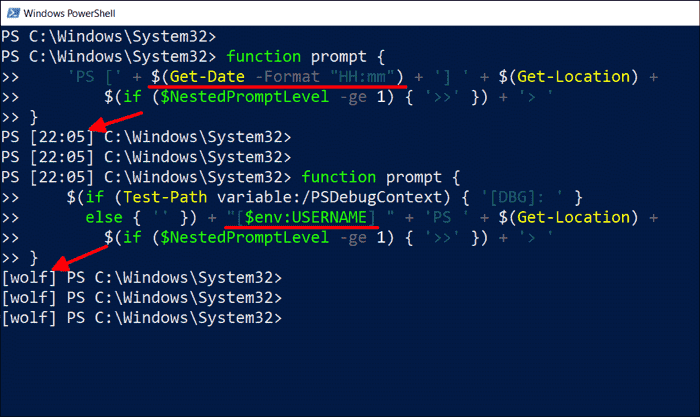
4sysops.com: how to change the PowerShell prompt (Mirror)
-

Get-AdComputer is not showing originating server
When I run an AD enumeration script, the Server I am running FROM never shows in the list…
-
Why is the Interactive PowerShell 5.1 So Limited?
I have discovered that the interactive powershell in version 5.1 is badly limited.
-

Windows Server 2019 Safe_OS Error Correction Poll
…did you just bail to a new build?